 Perfect
Tabs
browser_status · browser_tabs · browser_navigate · browser_back · browser_forward · browser_tab_focus · browser_tab_close
The bind
Out of the box, Cursor doesn’t give you trustworthy hands in the Chrome you already live in — cookies, SSO, the messy real web. Stock agent browser paths often lean on broad Mac automation permissions, then hog the machine while the run is live. Hard to ship real R&D when your desk is held hostage.
Perfect is the bridge I needed: local MCP, your real Chrome, a green Perfect tab group you can see, Manual approvals by default, and a Stop that actually stops.

Try a prompt
Perfect doesn’t invent a special search API. Agents chain real tools — navigate, wait, snapshot, press — on sites you approve.
Product walkthrough
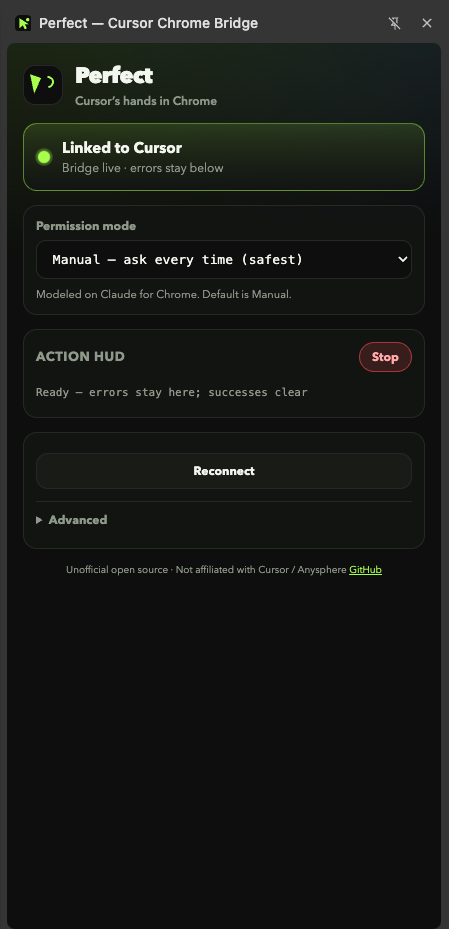
Welcome on first install. Linked when the bridge is live. Agent tabs grouped so you keep ownership of the desk.
browser_status · browser_tabs · browser_navigate · browser_back · browser_forward · browser_tab_focus · browser_tab_close
browser_snapshot · browser_extract · browser_console · browser_network · browser_wait
browser_click · browser_hover · browser_drag · browser_fill · browser_type · browser_select · browser_upload · browser_press · browser_scroll · browser_handle_dialog
browser_screenshot — annotations, fullPage, clip
browser_evaluate · browser_propose_plan · browser_stop
Manual mode · protected pauses · Buy now / checkout prohibited · local token · no Perfect cloud
How to connect
Easiest:
Add to Chrome
from the Chrome Web Store. Or
download the zip,
unzip, then Load unpacked from chrome://extensions.
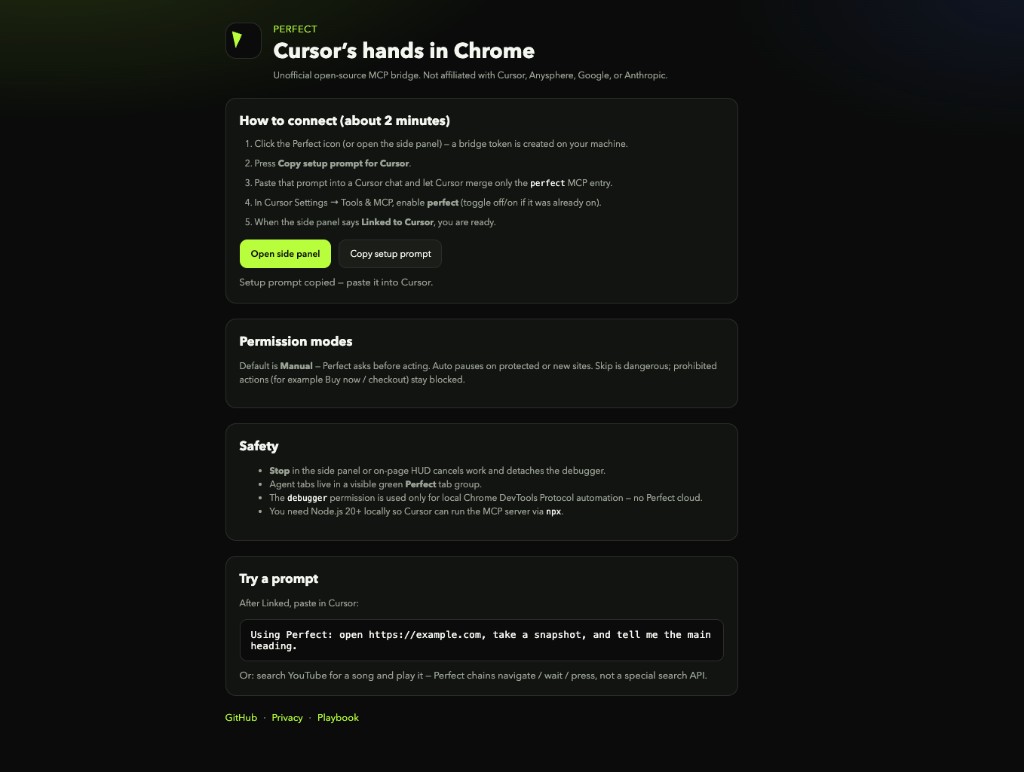
Open Perfect → Copy setup prompt for Cursor. It merges only the perfect MCP entry (npx -y perfect-mcp, GitHub fallback if needed).
Settings → Tools & MCP → enable perfect (toggle off/on if it was already on). Node.js 20+ required.
Side panel shows Linked to Cursor. Agent tabs appear in the green Perfect group. Reconnect pings without tearing down a live bridge.
Then you’re Linked
Agent tabs stay in the green Perfect group — you keep the desk while the bridge runs locally.

Permission & safety
Modeled on Claude-for-Chrome-style gates. Default is Manual. Skip is dangerous — prohibited actions still hard-block.
Stop in the side panel or on-page HUD cancels work and detaches the debugger.
The debugger permission is only for local Chrome DevTools Protocol automation — not remote control by a Perfect server.
Honest limitations
YouTube and similar sites may need navigate + wait + screenshot + keyboard (k) instead of a perfect accessibility tree.
Search is navigate + fill + click like a person. That’s intentional.
You need Node.js 20+ for the MCP server via npx. Extension alone is not enough.
Install from the Chrome Web Store or load the GitHub zip unpacked. You still need Node.js 20+ for the local MCP server.
Privacy by default
Bridge token, permission preferences, welcome-seen flag, local audit log.
Snapshots and page text flow only over the local MCP connection you configure. That client’s policy applies next.
No Perfect analytics SDK. No sale of personal data. Full policy on the privacy page.
Download
perfect-extension.zip from
GitHub Releases
→ Load unpacked.Why I built this
I use Cursor every day. The moment the work left the repo — live forms, WPBakery builders, real research tabs, media checks — I hit the same wall: there was no clean, local, permissioned bridge into the browser I already trust.
The alternatives asked for heavy OS permissions, then made the machine feel occupied while the agent ran. That’s fine for a demo. It’s terrible for shipping.
So I built Perfect: MCP on localhost, a token you own, a side panel that says Linked, a green tab group you can see, Manual by default, Stop when you need it. Free, open source, unofficial — because the gap was real.
Same cookies. Same session. Visible agent tabs. Approvals I control. No Perfect cloud watching.
Anyone doing live R&D with Cursor — marketers, builders, researchers — who wants real execution in Chrome without losing the desk.


About the maker
WordPress product marketer · stubborn problem-solver · lifelong Harry Potter devotee
By day I am the Product Marketing Specialist at WPBakery. Before that, I helped a single plugin cross 400,000+ active users. When the day-job owl flies home, I tinker on my own workshop of spells.
Also from the workshop
Free, local-first where it counts.
FAQ
No. Unofficial open source — not affiliated with Cursor, Anysphere, Google, or Anthropic.
No Perfect cloud in v0.2. Token and preferences stay local. Tool results go only to your configured MCP client.
Node.js 20+ so Cursor can run npx -y perfect-mcp (GitHub fallback if the npm package isn’t published yet).
Yes — Add Perfect from the Chrome Web Store. GitHub Releases zip remains available for Load unpacked / contributors.
MIT. Free to use, fork, and share.
Support
Share this page: gtarafdar.github.io/perfect/#support